![HMLogo RGB high res.png]](https://knowledgebase.hollandmechanics.com/hs-fs/hubfs/HMLogo%20RGB%20high%20res.png?height=48&name=HMLogo%20RGB%20high%20res.png)
INSTRUCTIONS FOR USE – WHEEL COMPARISON TOOL (DISH TOOL)
1. Position the toolPlace the tool tips on the rim.
• Adjust the center point until it contacts the axle (hub).
• Tighten to lock the measurement.
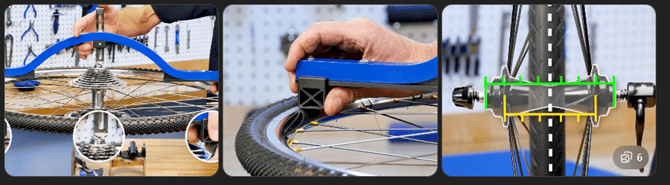
• Remove the tool.
• Rotate it to the opposite side of the wheel.
• Place it back on the rim.
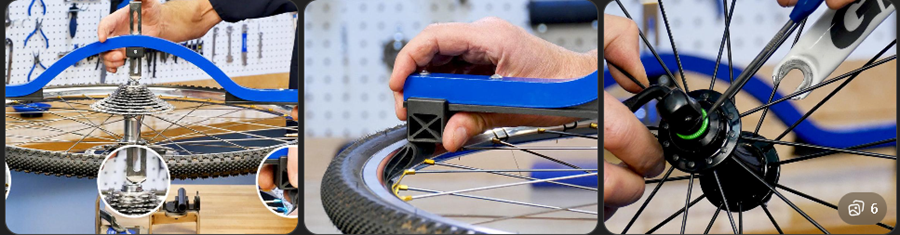
3. Check the result
• If the center point makes equal contact → the wheel is centered.
• If it does not make contact or there is a gap → the wheel is off-center.
• Pay attention to which side is facing up on the lacing machine.
• This side must be compared with the side that was facing down during the machine setup.
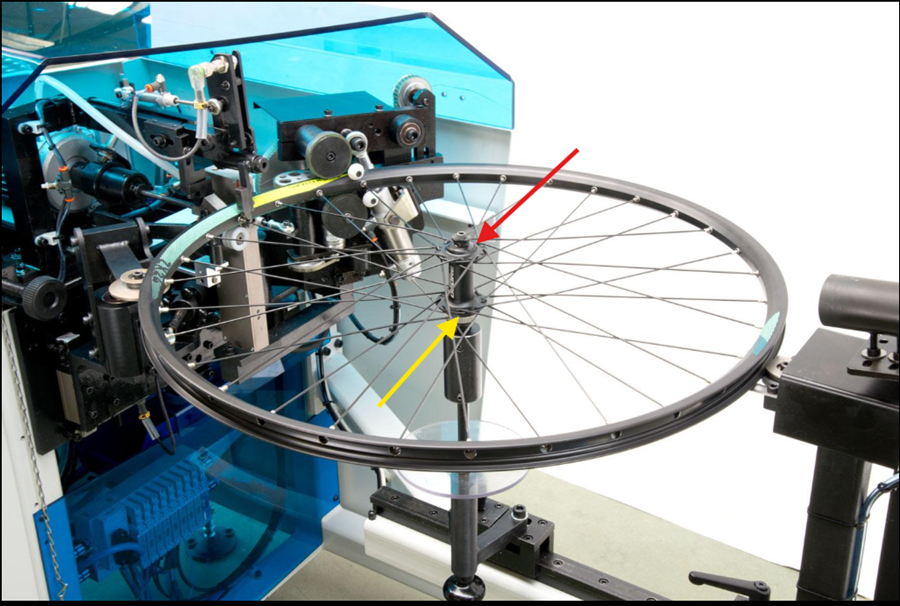
Adjustment procedure
• If, during the comparison, the tool makes proper contact on the upper side and shows a gap on the lower side, the wheel is identified as off-center.
• In this condition, the rotation of Group 1 and Group 2 must be increased until equality is achieved on both sides.
• The adjustment must be carried out gradually, checking again with the tool after each correction.
Adjustment principle
- Increasing the rotation on one side will cause that side of the wheel to move inward.
Reference rotation values
-
- Reference rotation values
Front wheels
• For front wheels, it is extremely common for the rotation values to be equal across all groups.Example:
• Group 1 = 10
• Group 2 = 10
• Group 3 = 10
• Group 4 = 10• In some models, the following configuration may also occur:
Example:
• Group 1 = 10
• Group 2 = 10
• Group 3 = 9
• Group 4 = 9• This variation is normal depending on the rim type.
Rear wheel
• For rear wheels, there is a significant difference between the groups.Example:
• Group 1 = 30
• Group 2 = 30
• Group 3 = 15
• Group 4 = 15• This occurs because the rear wheel has one side with higher tension, creating a geometry where one side is flatter than the other.
Important note
• The values shown are for reference only.
• They do not represent actual adjustment values.
• Testing and verification must always be carried out according to the rim and the specific setup.